Inverse regression 2
Download: InverseRegression2_init.xlsx
Introduction
In this screencast we will perform inverse regression using polynomial regression models. The CLS-Stats add-in provides some tools for this task and we will explore them here as well as how to recognize edge cases in inverse regression.
Learning Goals
- Review and additional practice at choosing appropriate polynomial regression models
- Learn to use the
PolyInvfunction and theInverse RegressionVBA procedure (which invokesSOLVER). You should consider reviewing the documentation for both of these: - Learn to recognize when edge cases might occur and what causes them
Tasks
- Use
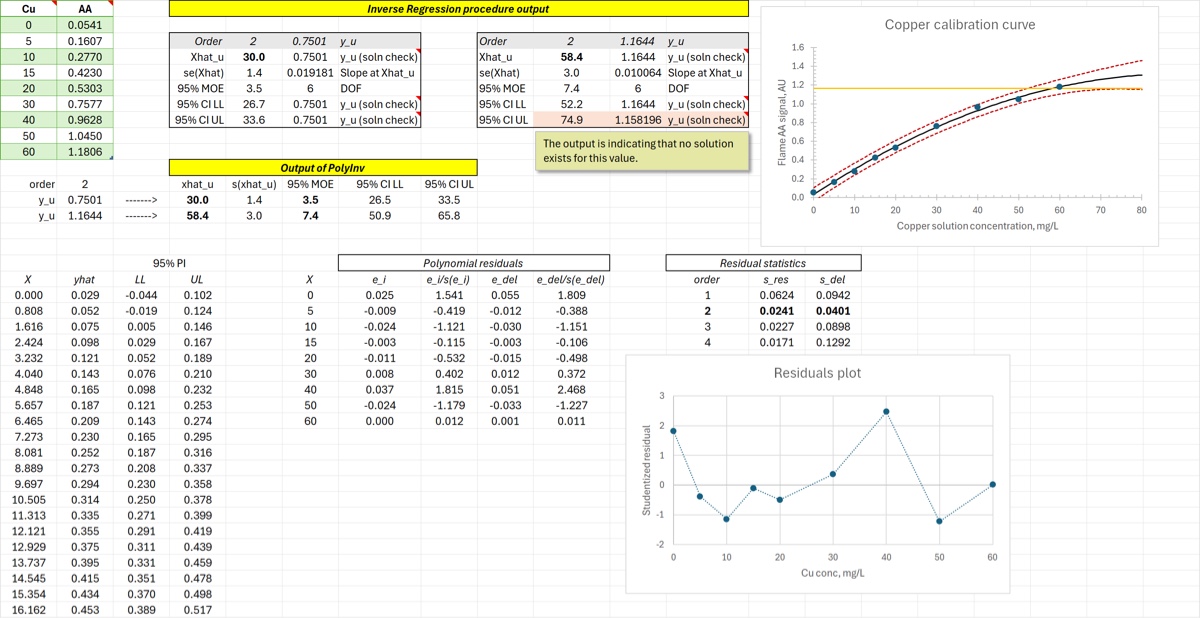
PolyPredto add the best fit () and the prediction band to the plot. It should respond to changes in the order. - Use residuals (plots and statistics) to choose an appropriate order for the polynomial fit
- Use
PolyInvto calculate the (approximate) confidence intervals for for each of the two values - Use the Inverse Regression VBA procedure to calculate exact CIs for those values and explain any descrepancies
At the end of your screencast your spreadsheet should look something like the image below.