Confidence intervals 2
Download: CalculatingParametricCI-mean_init.xlsx
Download: Screencast-Slides.pdf
Introduction
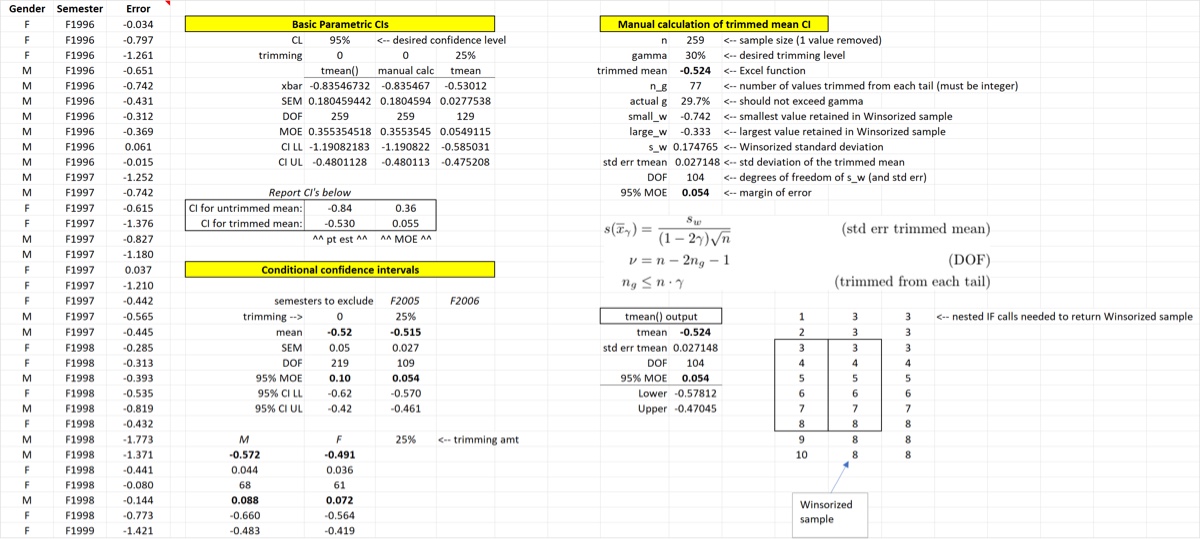
This screencast demonstrates how to calculate parametric confidence intervals for the mean and trimmed mean in Excel, both manually and using the CLS-Stats lambda functions. I would say that you should be able to calculate the untrimmed mean parametric CI without using the tmean function, if necessary. Calculating the parametric CI of the trimmed mean is a little more tedious but it is nice to see it done once so that you understand how it was calculated.
Learning Outcomes
- Understand what a parametric confidence interval is
- Learn how to calculate the parametric confidence interval of the (untrimmed) mean manually, without using
tmean - Learn how to use and interpret
tmeanto generate confidence intervals (and conditional confidence intervals usingFILTER) - Learn how to report confidence intervals with the appropriate number of significant figures
- Learn how many values are trimmed in a trimmed mean
Tasks
- Use
tmeanto calculate the 95% CI for the untrimmed mean - Report the CIs calculated above
- Manually calculate the parametric CI for the untrimmed mean
- Use
FILTERto calculate the 95% CI for the untrimmed mean with two semesters removed from the data - Use
FILTERto calculate the 95% CI for the 25% trimmed mean by gender - Manually calculate the 95% CI of the 25% trimmed mean and compare to the output of
tmean
When you are finished your spreadsheet should look something like the one below.