Randomize Seed
Keyboard shortcut: Alt-F9
Description
This VBA procedure is used to reset the system seed that is used by the CLS-Stats runif function and all the functions that depend on it, such as rerror and JitterPlot. Those functions all accept seeds for reproducibility and so that they can be nonvolatile.
When a workbook is created, the CLS-Stats add-in will create a random system seed. This is a hidden named value, CLS_SystemSeed. It is specific to a workbook but it can be changed by running the Randomize Seed item in the Analysis menu (or using the Alt-F9 keyboard shortcut).
Use
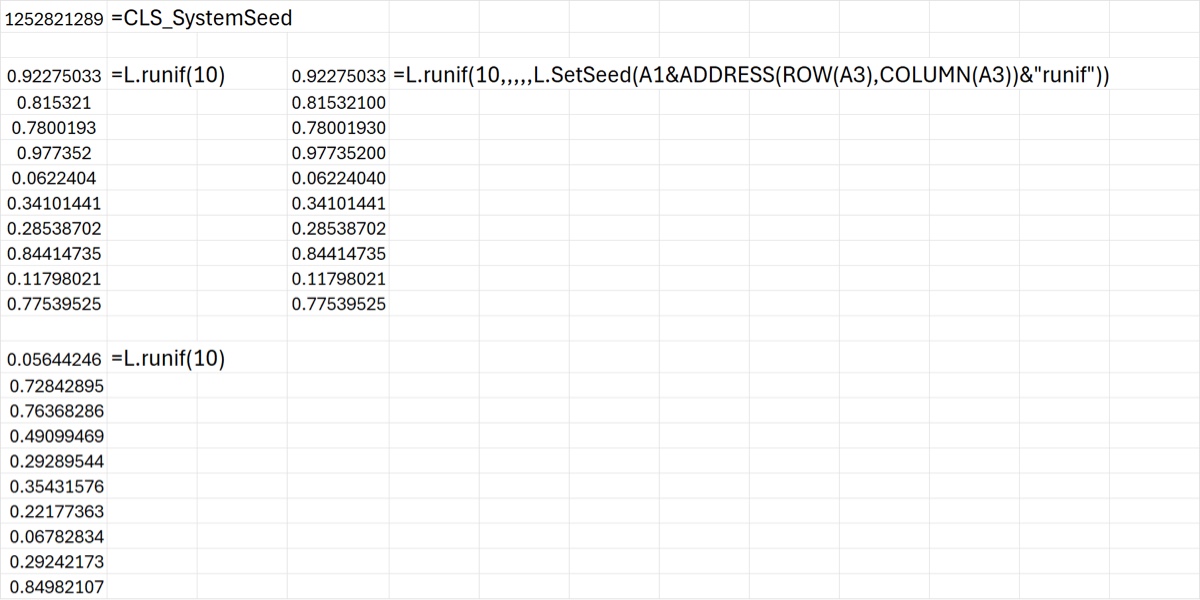
If you do not specify a seed for runif (or one of the functions that depend on it) then the system seed is used to seed the function, but not directly. Instead it is concatenated with two other items: the address of the cell in which the cell formula exists, and the name of the calling function. This is illustrated below.
The top cell shows the current value of the system seed, which can be changed quickly by using Alt-F9. A call to runif below it does not specify a seed, so the system seed is combined with the cell address (A3 in this case) and the calling function name “runif” to create a string input into the SetSeed function that is used to generate a seed. This is illustrated in the cell formula on the right of L.runif(10), which recreates the seed in the cell formula and hence produces the same sequence of random numbers.
This means two things in practical terms:
- the seed is specific to the workbook, the address of the cell formula, and the calling function. This is almost (but not quite) unique; for example you can see the second
L.runif(10)formula below the first produces a different set of random numbers even though the formula is the same and they both use the same system seed. BUT if the same unseeded function was used in the same cell (A3) in a different worksheet in this workbook, it would use the same seed and would thus generate correlated random numbers. - changing the system seed will change the output of
runifand other unseeded CLS-Stats RNGs
Regarding the latter: repeatedly using the Alt-F9 keyboard shortcut is a way to simulate volatile behavior in unseeded CLS-Stats RNGs. Sometimes volatile functions are useful in demos so this is a way to make runif and similar functions act as if they are volatile temporarily. Think of it as similar to using F9 to trigger recalculation of volatile functions like RANDARRAY but specific to CLS-Stats RNGs that are not given an explicit seed.
Go ahead and give it a try in the Excel workbook attached below. When you open it it should have the same sets of random numbers as you see below, but typing Alt-F9 will invoke the VBA module to reset the system seed, changing the numbers. (But the top two sets of 10 numbers will remain the same.)
Download: RandomizeSystemSeed.xlsx