SetSeed
Description
SetSeed returns an integer that can be used as a seed for a random number generator (RNG). It accepts a string input and uses a hash to return an integer. That way one can use a memorable word or phrase to generate an appropriate seed for reproducible simulations.
SetSeed is a helper function called in runif (and hence in the functions that depend on it), so you won’t normally want to call it in a cell formula unless you want to know the integer that it produces (which is the true seed for the runif algorithm).
Syntax
SetSeed(str) where str is a string.
Some important notes on usage:
- strings that differ only in the last 1-2 characters produce nearly identical seeds, so the first value drawn by
runifis nearly identical (see the caveats in the runif documentation) SetSeedis case sensitive…but if you only capitalize the last 1-2 characters then you get very similar seeds
Example
Below are examples of the use of SetSeed to generate an RNG seed from an input string. Most commonly it is used within a call to an RNG function, as with runif below. Both cells point to the same seed string and thus generate the same series of “random” numbers.
Note the usage notes above:
- if you need to have a number of autogenerated seeds, put the number at the beginning, not the end, of the string
- the examples below were generated with formula
=SEQUENCE(5)&"MySeed"for example (don’t put theSEQUENCEcall at the end) - if you are in a table you can’t use
SEQUENCEbut you can useROW()to achieve a similar effect
- the examples below were generated with formula
See the output below (and the attached Excel spreadsheet) for examples of this behavior.
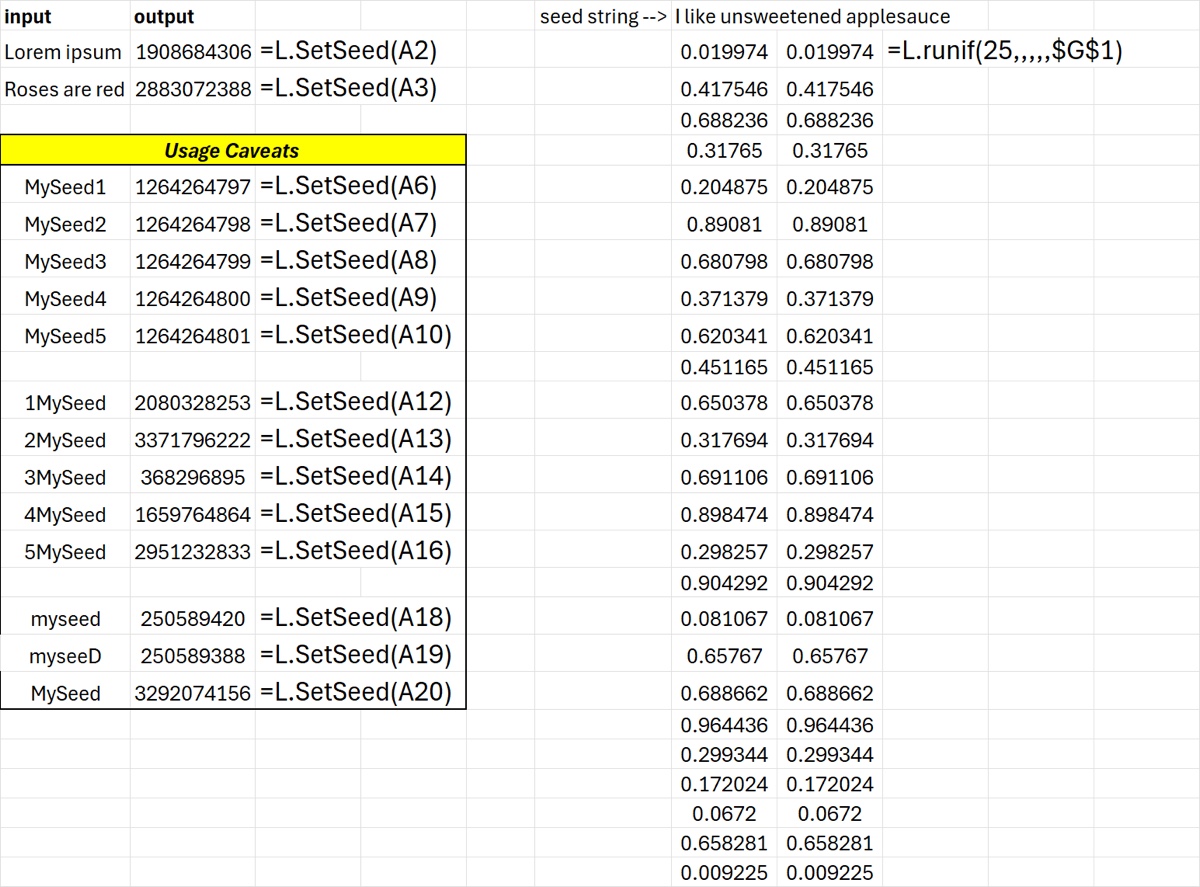
Download: SetSeed.xlsx
Source Code
SetSeed = LAMBDA(
    str,
    LET(
        s, TEXT(str, "@"),
        h0, 5381,
        step, LAMBDA(h,c, MOD(h*33 + c, 2^32)),
        // SEQUENCE(0) errors, so guard the empty-string case rather than hash it
        IF(
            LEN(s) = 0,
            h0,
            REDUCE(h0, UNICODE(MID(s, SEQUENCE(LEN(s)), 1)), step)
        )
    )
);