runif
Description
runif is the foundational random number generator (RNG) used in CLS-Stats. It returns samples from a uniform probability distribution using the L’Ecuyer (1988) combined RNG: two independent Park-Miller style LCGs. It is comparable to Excel’s RANDARRAY function. It is the foundational function for the other RNGs in CLS-Stats: rnorm, rlnorm, and rerror.
Excel’s RANDARRAY function is a better and faster RNG, so why use runif? There are two reasons:
runifis non-volatile by defaultrunifcan be seeded, which can be valuable for reproducibility purposes.
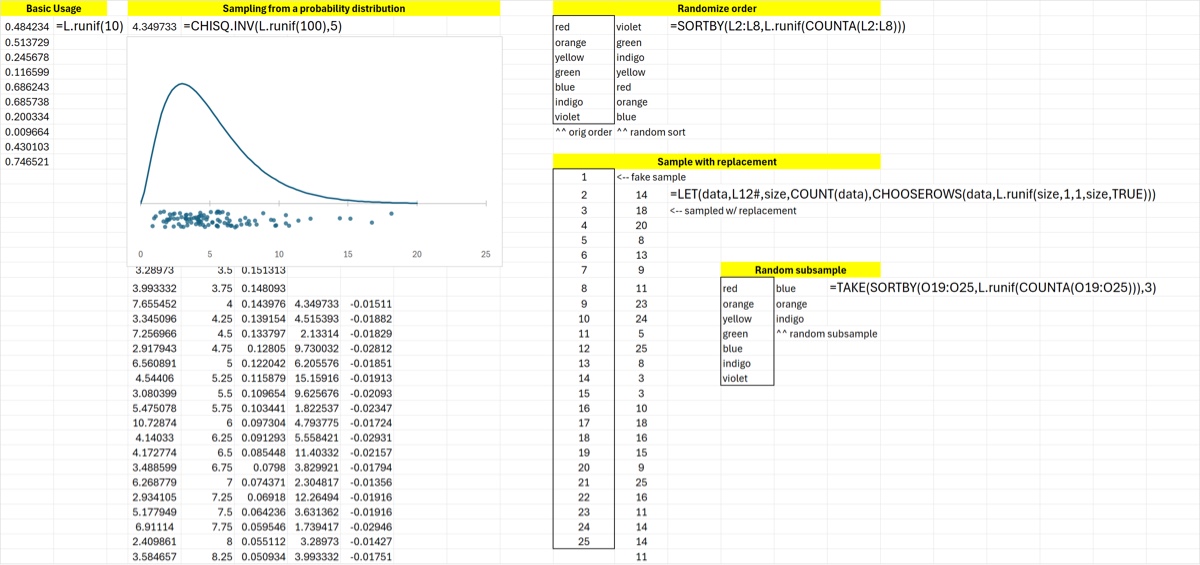
There are a few common use cases for runif.
- Since it can be used to sample the uniform distribution in the range , it can be used to draw samples from other distributions by using the inverse distribution function. This is the basis of the use of
runiffor simulation purposes. Thernorm,rlnormandrerrorfunctions are examples of this use, but other Excel functions can be used to sample from other distributions. - It can be used to resample another sample with replacement
- It can be used to randomize the order of a list.
- It can be used to select a random sub-sample of a sample.
Examples of all these uses are shown below. RANDARRAY can also be used for those purposes – and should be for critical applications – but that would result in a volatile function.
Syntax
runif([rows=1], [cols=1], [lower=0], [upper=1], [whole=FALSE], [seed_str]), where
rowsandcolsdictate the number and shape of the output random numbersloweranduppercontrol the bounds of the random numberswholeis a boolean (defaultFALSE) that controls whether integers are producedseed_stris a memorable string that seeds the RNG reproducibly
If seed_str is left blank then a seed string is constructed from a string composed of a workbook-specific system seed concatenated with the function name and the cell address. This is the default seed also for other RNGs such as rnorm and rerror. The seed is a “quasi-unique” seed that is duplicated under only one condition: when the same RNG function is used in the same workbook on different worksheets at the same address.
Leaving the seed_str blank is fine for quick & dirty work but for simulation demos you will either want to set the seed with a memorable string or make the function volatile with GetSeed. Look at the documentation of those functions for more details, but please note the following caveats about seed strings. They apply to every CLS-Stats RNG that accepts a seed_str (rnorm, rlnorm, rerror, and the MCM functions), since they all use runif.
- If you need multiple seeds don’t use “seed_1”, “seed_2”, etc; instead use “1_seed”, “2_seed”. Seeds that differ only in the last 1-2 characters produce sequences that start with nearly the same value; the later values are uncorrelated, but the two sequences are not fully independent. Differences in the FIRST few characters give unrelated sequences.
- Similarly if you want to autogenerate reproducible seeds across (say) rows in a table, use
=ROW() & "my seed"and not="my seed" & ROW(). In other words, it is better to prepend 1-2 character differences rather than append them. - Finally: the seed strings are case-sensitive. So “My string” and “my string” will give different outputs. But (as explained above) a difference in capitalization early in the string is better than one in the last 1-2 characters.
Example
The use cases mentioned above are demonstrated below. Of course RANDARRAY can also be used instead of runif but would result in volatile formulas which would have to be changed to values. In terms of resampling, BootSample is simpler and more versatile (eg, smoothed resampling is possible) but is also volatile since it uses RANDARRAY under the hood.
A major use case for runif is with simulations, as shown below with the chi-squared distribution. The jitterplot visually compares the 100 random values produced with the theoretical probability distribution. (See the Excel file for more details on how this plot was generated.)
Download: runif.xlsx
Source Code
runif = LAMBDA(
    [rows],[cols],    // size of output array (default 1 x 1)
    [lower],[upper],  // defines range (default [0,1])
    [whole],          // boolean whether to round to integer (default FALSE)
    [seed_str],       // optional seed string (default uses this workbook's CLS_SystemSeed)
    LET(
        rows, IF(ISOMITTED(rows), 1, rows),
        cols, IF(ISOMITTED(cols), 1, cols),
        lower, IF(ISOMITTED(lower), 0, lower),
        upper, IF(ISOMITTED(upper), 1, upper),
        whole, IF(ISOMITTED(whole), FALSE, whole),
        seed, IF(
            ISOMITTED(seed_str),
            SetSeed(CLS_SystemSeed & ADDRESS(ROW(),COLUMN()) & "runif"),
            SetSeed(seed_str)
            ),
        m_1, 2147483563,
        a_1, 40014,
        m_2, 2147483399,
        a_2, 40692,
        // each component gets the same input seed, reduced into its own valid
        // range -- standard approach (this is how ran2 does it too), not a
        // decorrelation hack; the two LCGs' different a/m immediately diverge
        // them. A seed congruent to 0 mod m1 (or m2) would degenerate that
        // component to an all-zero sequence forever, so guard it to 1.
        seed1, IF(MOD(seed, m_1) = 0, 1, MOD(seed, m_1)),
        seed2, IF(MOD(seed, m_2) = 0, 1, MOD(seed, m_2)),
        step1, LAMBDA(s, _, MOD(a_1 * s, m_1)),
        step2, LAMBDA(s, _, MOD(a_2 * s, m_2)),
        s_1, SCAN(seed1, SEQUENCE(rows, cols), step1),
        s_2, SCAN(seed2, SEQUENCE(rows, cols), step2),
        j, s_1 - s_2,
        jAdj, IF(j < 1, j + m_1 - 1, j),
        unit, jAdj / m_1,      // in the open interval (0,1)
        IF(
            whole,
            // floor-based, not round-based
            INT(unit * (upper - lower + 1)) + lower,
            unit * (upper - lower) + lower
        )
    )
);