PolyLS
Description
PolyLS is a convenient version of OLS or WLS specifically for (possibly weighted) polynomial regression. Other than the input data all you need to do is specify the polynomial order and it will create the necessary additional columns before performing the regression analysis. The labeled output is the same as OLS and, similarly, it will filter out non-numeric values before doing the calculations.
Syntax
PolyLS(Y, X, [p=1], [S]) where X and Y are the independent and dependent data (as row or column vectors) and p is the polynomial order (defaulting to p = 1 (Simple Linear Regression SLR)). The optional S values are standard deviations of the variables to be used in weighted regression with weights .
The output of the function is exactly the same as with the OLS function; please see that documentation for more detail.
Example
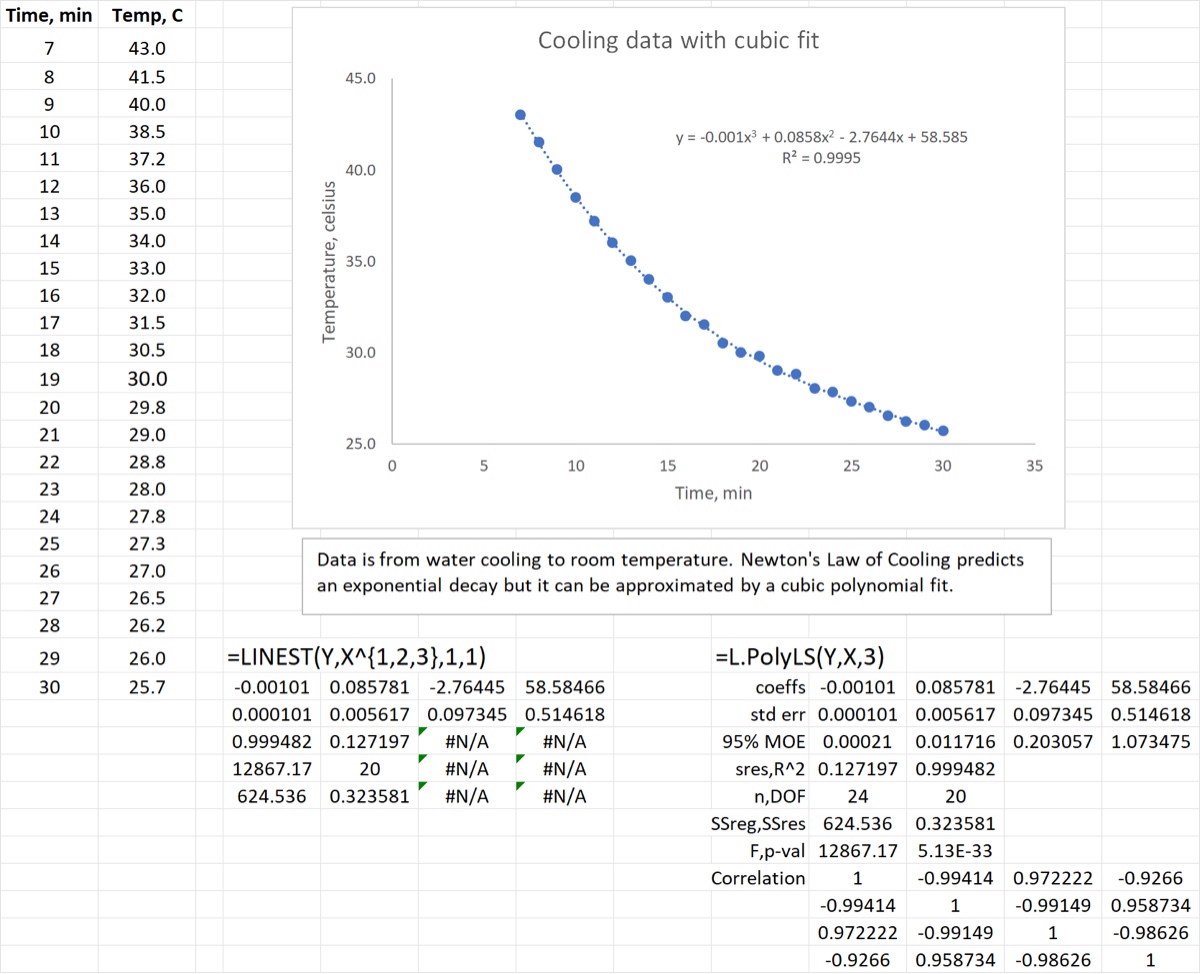
The example below compares how one would do a cubic fit (polynomial order of 3) to data using LINEST and PolyLS. For LINEST the most compact way to create the X matrix (containing 3 columns: , , and ) is to use an array expansion as shown: X^{1,2,3}. If we used OLS we would have to do the same thing. With PolyLS the function call is much simpler.
Download: PolyLS.xlsx
Source Code
PolyLS = LAMBDA(
    Y, // dependent values as row or column vector
    X, // independent values as row or column vector
    // X and Y must be same length but can contain non-numbers
    [p], // p is the optional polynomial order (default p=1)
    [S], // optional std devs of Y for weighted LS
    LET(
        p, IF(ISOMITTED(p), 1, p),
        // filter X and Y (and S) for non-numbers and empty cells
        NumFilter, IF(ISOMITTED(S), ISNUMBER(X) * ISNUMBER(Y), ISNUMBER(X) * ISNUMBER(Y) * ISNUMBER(S)),
        Xn, FILTER(X, NumFilter),
        Yn, FILTER(Y, NumFilter),
        // use OLS or WLS for the heavy lifting
        IF(
            ISOMITTED(S),
            OLS(Yn, Xn ^ SEQUENCE(, p)),
            WLS(TOCOL(Yn), TOCOL(Xn) ^ SEQUENCE(, p), TOCOL(FILTER(S, NumFilter)))
        )
    )
);