Integrate
Description
Integrate performs numeric integration using the Trapezoid Rule.
Syntax
Integrate(Y, [X]) where
Yare the values to be integrated. This can be a matrix (dimensions either or ) or a single column or row vector.X, if present, is either a scalar step size or the X values (with as many elements as theYinput)
Example
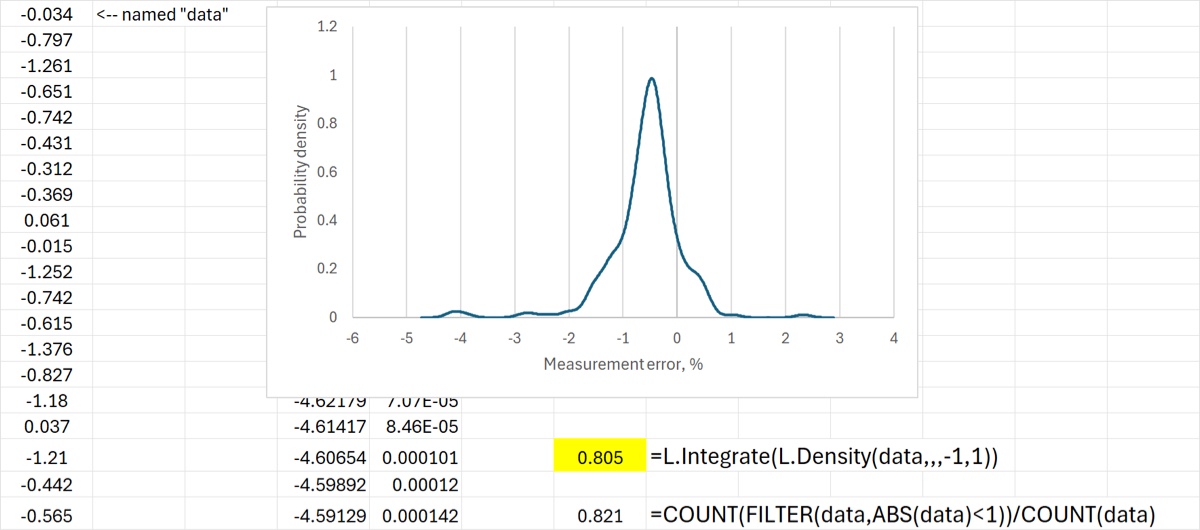
Numerical integration has many applications in science, not just in statistics. But let’s say we wanted to use the KDE (which is an estimate of the probability density) to find the probability that the measurement is within 1% of the true value. The use of Integrate for this purpose is shown below; a simple count (and a visual inspection) verifies that the number passes a sanity check.
Download: Integrate.xlsx
Source Code
Integrate = LAMBDA(
    Y, // values to be integrated (row or column)
    [X], // if present: either a constant step-size or the x-values
    LET(
        Yn, IF(
            ISOMITTED(X), // Y contains both X and Y values?
            IF(COLUMNS(Y) = 2, INDEX(Y, , 2), INDEX(Y, 2)), // values as rows or cols?
            Y // Y is just Y values
        ),
        Xn, IF(
            ISOMITTED(X), // if omitted get values from 1st argument
            IF(COLUMNS(Y) = 2, INDEX(Y, , 1), INDEX(Y, 1)),
            X
        ),
        n, COUNT(Yn),
        IF(
            n = 1,
            0, // there is nothing to integrate (just one point)
            LET(
                // need indices for the summation
                i, SEQUENCE(n - 1, , 2),
                IF(
                    COUNT(Xn) = 1, // step size or vector?
                    SUM(0.5 * Xn * (INDEX(Yn, i) + INDEX(Yn, i - 1))),
                    SUM(0.5 * (INDEX(Xn, i) - INDEX(Xn, i - 1)) * (INDEX(Yn, i) + INDEX(Yn, i - 1)))
                )
            )
        )
    )
);